MØMCX

Amateur Radio Operator


The M0XXT Mega-Loop antenna - VHF gain for the HF bands

Many people ask me what our HF antenna is. It’s just a delta loop antenna (triangle) made from 2mm wire at about 58m per leg (174m perimeter) with a height above ground of around 60 to 80 feet (depending on tension) fed with coax to a 4:1 balun at the feedpoint in one corner. It is horizontal and strung between three large oak trees. The main RF gain is opposite the feedpoint. We achieve less than 2:1 across most of the ham bands. It even works for WARC bands too.
Over the last two years, we have had huge success with this antenna which tunes from 160m band right up to 6m (we’ve even used it on 2m and 70cms!). Originally, this design was for 80m perimeter but we extended it to twice the size on a whim and it worked even better. The plots that follow are now inaccurate. These are extremely conservative. Doubling the size makes the 20m plot look more like the 10m plot now.Go check the last picture below. It says 10m band but this is what we’re actually achieving on 20m. Isn’t that amazing? 10m is off the scale with less than 5% take-off angles.
I have held a pile up from Birmingham (UK) to West Coast of USA on 10w. Receiving 57 reports at that power. Running 400w delivers consistend 20dB over S9 reports in early eve, winter time.

XXT loop

20m loop

15m

10m XXT Loop

March 21st, 2011 Posted by admin | Amateur Radio | no comments

Power Over Ethernet - Buffalo G54 - WiFi Antenna

POEI found my old article recently regarding my home-brew Power Over Ethernet Project. James and will shortly be putting internet at the Scout Hut around one mile away and having my router as close to the antennas as possible will be mandatory. Here’s an old project that I wrote up in 2009:

Using very high quality coax from my vertical antenna to a router in the shack is a very expensive option due to the very high losses at 2.4 GHz. We could use Ecoflex 15, but at £6 per meter and £9 for a connector, it’s a bit rich for a kids experiement.

Better bet is to site the router on top of the mast right next to the antenna in a waterproof box, using just a tiny pig-tail of coax from the antenna directly to the router. Of course, you need power to the router which might mean sending 240v utility power up the mast to the little PSU that comes with the router. Not a good option, having mains dripping off a mast.

How about cutting the low voltage line from the router’s PSU and extending it so that you have just DC running up the mast instead of mains? You can, but why not use the spare data pairs in the CAT 5 spec instead. These are pins 4 & 5 and 7 & 8. Connect the pairs together to lower the resistance (Ohms Law).

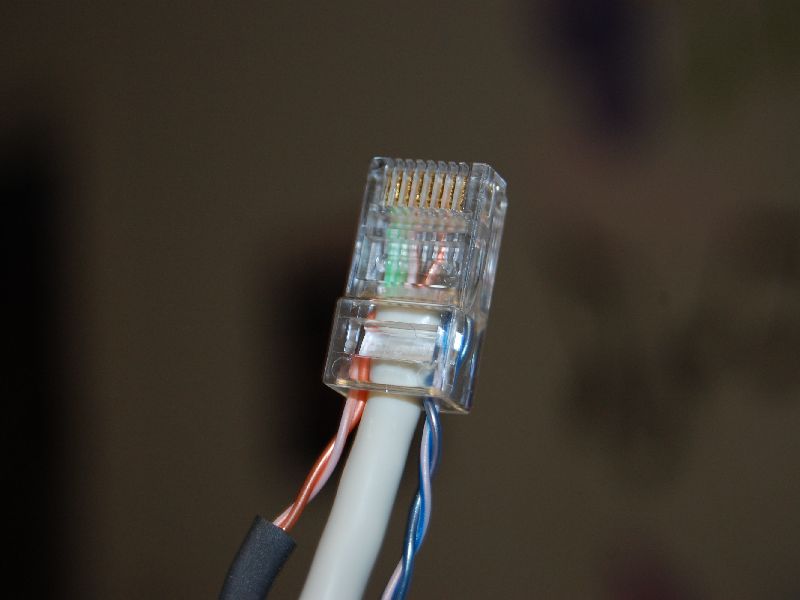
Power Over Ethernet Buffalo G54Ignore the colours that I have used in my project, this was to make fault finding easy in the future; blue being the negative and orange for positive - although in typical amateur radio style, I got these muddled up so now they’re the wrong way around and I wish I had just used the normal colours for the data now! Grrr.

Cat 5 Wiring DiagramI made up a 20 meter run of Cat 5 and injected 3.3 V DC from the little PSU that came with the router and pulled it out at the router end, as per the picture. Initially it failed miserably since the voltage drop was too low. The PSU was rated at 3.3V DC and 2A. Essentially, once the Router tried to suck any power down the line, the voltage dropped like a stone and the router wouldn’t boot up.

Throwing caution to the wind, I cut the 3.3V PSU off and substituted a 7V DC PSU which was lying about. My multimeter is currently on the boat, so I just did some rough mental calculations and guessed that the voltage would drop by around half, giving me maybe about 3.5 to 4 volts. Hopefully tolerable by a modern 3.3V device. I’ll measure it sometime, under load as well as no-load conditions.

Second caution to the wind was that when I cut the 7V cable off the donated PSU, I realised that the wires on the new device were not marked. I had no idea which was positive and which was negative. Not having a spare multimeter, I just hoped that getting the negative and positive the wrong way around wouldn’t concrete the damned thing. Luckily, Buffalo G54’s are two-a-penny these days on eBay and all my 2.4 GHz wireless experiments use these excellent devices. It wouldn’t be the first time that I had bricked one. Luck was in my favour tonight though and it all booted up just fine. Lucky or what?!
To sum up, if you are to do this, use pins 1, 2, 3 and 6 for the data and pins 4 & 5 and pins 7 & 8 for the DC as per diagram. Getting pins 1, 2, 3 and 6 wired up was a weird thing to do since I’ve always been paranoid to wire up every wire correctly. I suppose one ought to since in the future, someone might try and use your patch cable in a POE environment and it fails. Worse still, cabling a whole building and only testing pins 1, 2, 3 and 6!

Have fun.

Callum.

March 21st, 2011 Posted by admin | Amateur Radio | no comments